
 Tim Ross
Microsoft's own API settles the first question in this comparison. The Graph API returns event subject, body, location, attendees, and recurrence as ordinary readable fields, and the new Outlook client goes further by routing calendars from other providers through Microsoft's servers too. This post compares Outlook Calendar with SilentSuite, which encrypts event content on the device, on what the server can see, what protocols each speaks, and what each one costs.
Outlook Calendar is not end-to-end encrypted, and Outlook has no native CalDAV either, so there is no standards-based way to keep your events out of Microsoft's reach. Microsoft's support page says the new Outlook copies non-Microsoft accounts into Microsoft data centres, which means connecting another provider widens the exposure rather than routing around it. SilentSuite encrypts event content on your device with XChaCha20-Poly1305, so its server holds ciphertext, and desktop clients read your calendar through a bridge running on your own machine.
What can Microsoft read in your Outlook calendar?
The clearest evidence is Microsoft's own API. The Microsoft Graph event resource returns subject, body, bodyPreview, location, attendees, organizer, recurrence, categories, and start/end as ordinary fields. Nothing on that page describes those fields as encrypted to anyone but Microsoft.
A server that can hand an application your event title, its notes, its address, and its guest list is a server that holds those values in a readable form. Microsoft has not published a statement saying “Outlook Calendar is not end-to-end encrypted,” so I will not put those words in their mouth. The field list is the evidence, and it is Microsoft's own.
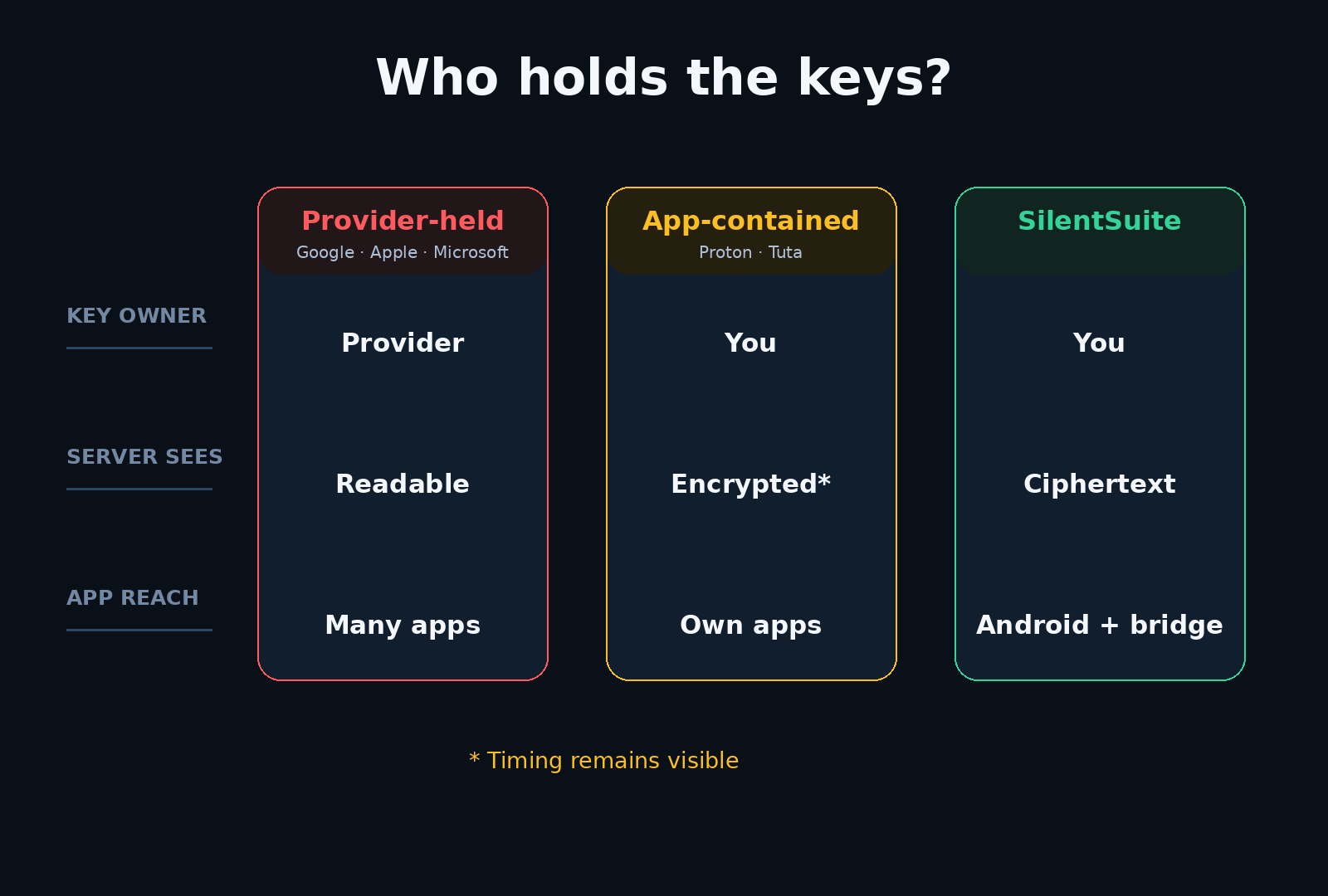
Does the new Outlook send other providers' calendars to Microsoft?
This is the part most people miss. Adding a non-Microsoft account to the new Outlook client does not keep that account's data with the original provider. Microsoft's support page states that “a copy of your email, calendar, and contacts will be synchronized between your email provider and Microsoft data centers,” and that the Microsoft Services Agreement and Privacy Statement then apply to that copy alongside the original provider's terms.
So the question is not only “can Microsoft read my Outlook.com calendar?” It is also “can Microsoft read the calendar I keep somewhere else, if I open it in Outlook?” On Microsoft's own description, a copy of it lands in their data centres. That drew press criticism through 2024 and 2025. I cite the support page rather than the coverage, because the support page is the load-bearing source.
Does Outlook support CalDAV?
Not natively. Outlook does not speak CalDAV or CardDAV out of the box. The usual workaround is Outlook CalDav Synchronizer, a third-party COM add-in that supports classic Outlook (365, 2019, 2016, 2013, 2010, 2007). New Outlook does not support COM add-ins at all, so that route closes as users move to the new client.
Getting data out is possible but awkward. Desktop Outlook exports a calendar through File, Save Calendar, iCalendar (.ics). On the web, you publish a calendar and copy an ICS subscription link, which is a published feed rather than a one-shot file.
Outlook Calendar vs SilentSuite
| Feature | Outlook Calendar | SilentSuite |
|---|---|---|
| E2EE | No | Yes |
| CalDAV | No (third-party add-in) | Via bridge |
| Native integration | Strong (first-party apps on Windows, macOS, Android, iOS, web) | Native Android app + local bridge on desktop |
| Open source | No | Yes, AGPL-3.0 |
| Price | Microsoft 365 Basic $1.99/mo (as of 2026-08-15, USD) | From €3/mo (annual) |
| Status | Active | Active |
Microsoft 365 consumer pricing checked on the US storefront on 2026-08-15: Basic $1.99/mo, Personal $9.99/mo, Family $12.99/mo. I did not verify euro pricing, so I quote USD only. SilentSuite is €3/mo on the Early Adopter tier billed annually.
What does Outlook do better than SilentSuite?
Native integration, and it is not close. Outlook ships first-party apps on Windows, macOS, Android, iOS, and the web, with mail, calendar, and contacts in one place and a scheduling stack that most workplaces already run. SilentSuite has a native Android app, a web client, and a local bridge for tested desktop clients. iOS is on the roadmap and is not currently supported.
If your calendar is your employer's calendar, Outlook is very likely the right tool and this comparison is academic. The case for SilentSuite is the personal calendar: the appointments you did not choose to put on a corporate system.
What changes when event content is encrypted on your device?
SilentSuite encrypts event content on your device before it reaches the server, using XChaCha20-Poly1305 through the Etebase protocol. The SilentSuite server stores ciphertext. It can see that items exist, roughly how many there are, and when they were revised, but not the title, notes, location, or attendee list. The field-by-field breakdown is in what SilentSuite actually encrypts, and the limits of that guarantee are in SilentSuite's threat model.
The trade-off is that a server which cannot read your calendar cannot do server-side scheduling intelligence either. No Copilot summaries of your week, no automatic event extraction from mail. Desktop clients reach your data through a bridge that runs on your own machine and serves CalDAV on 127.0.0.1, which is a different shape of convenience from a cloud that reads everything for you.
FAQ
Is Outlook Calendar end-to-end encrypted?
No. The Microsoft Graph event resource returns subject, body, location, attendees, organizer, and recurrence as ordinary fields, which means Microsoft's servers hold those values in a readable form.
Can Microsoft read calendars from other providers that I add to Outlook?
On Microsoft's own description, a copy reaches them. Microsoft's support page states that a copy of your email, calendar, and contacts is synchronized between your email provider and Microsoft data centers, and that the Microsoft Services Agreement and Privacy Statement then apply to that copy.
How do I sync a CalDAV calendar with Outlook?
Classic Outlook can use the third-party Outlook CalDav Synchronizer COM add-in, which supports 365, 2019, 2016, 2013, 2010, and 2007. New Outlook does not support COM add-ins at all, so that route closes as users move to the new client.
What does SilentSuite cost next to Microsoft 365?
Microsoft 365 Basic was $1.99/mo on the US storefront on 2026-08-15. SilentSuite is from €3/mo on the Early Adopter tier billed annually, and self-hosting the AGPL-3.0 server is free beyond the infrastructure you run.
What do you give up by moving your calendar off Outlook?
Server-side intelligence and workplace scheduling. No Copilot summaries of your week, no automatic event extraction from mail. If your calendar is your employer's calendar, Outlook is very likely the right tool.
Microsoft is not alone in this design, and Outlook is not the only calendar worth checking. I put Google, Apple, Microsoft, Proton, Tuta, and Nextcloud side by side in who can read your calendar, and compared the encrypted options in encrypted calendar sync in 2026. If you want a calendar your provider cannot read, get started with SilentSuite.
Interested in private sync?
SilentSuite is available now as a public beta. Sign up and start syncing your calendar, contacts, and tasks with end-to-end encryption.
Get started for free