 Tim Ross
Apple Calendar, Thunderbird, and Evolution all speak CalDAV, and CalDAV expects to receive your events in plaintext. The whole point of SilentSuite, built on the Etebase protocol, is that nobody but you can read them. Those two facts look incompatible, and the thing that reconciles them is the SilentSuite bridge, a small local-only daemon that runs on your own computer. This post explains how it works under the hood, and why it has to run locally to keep the encryption intact.
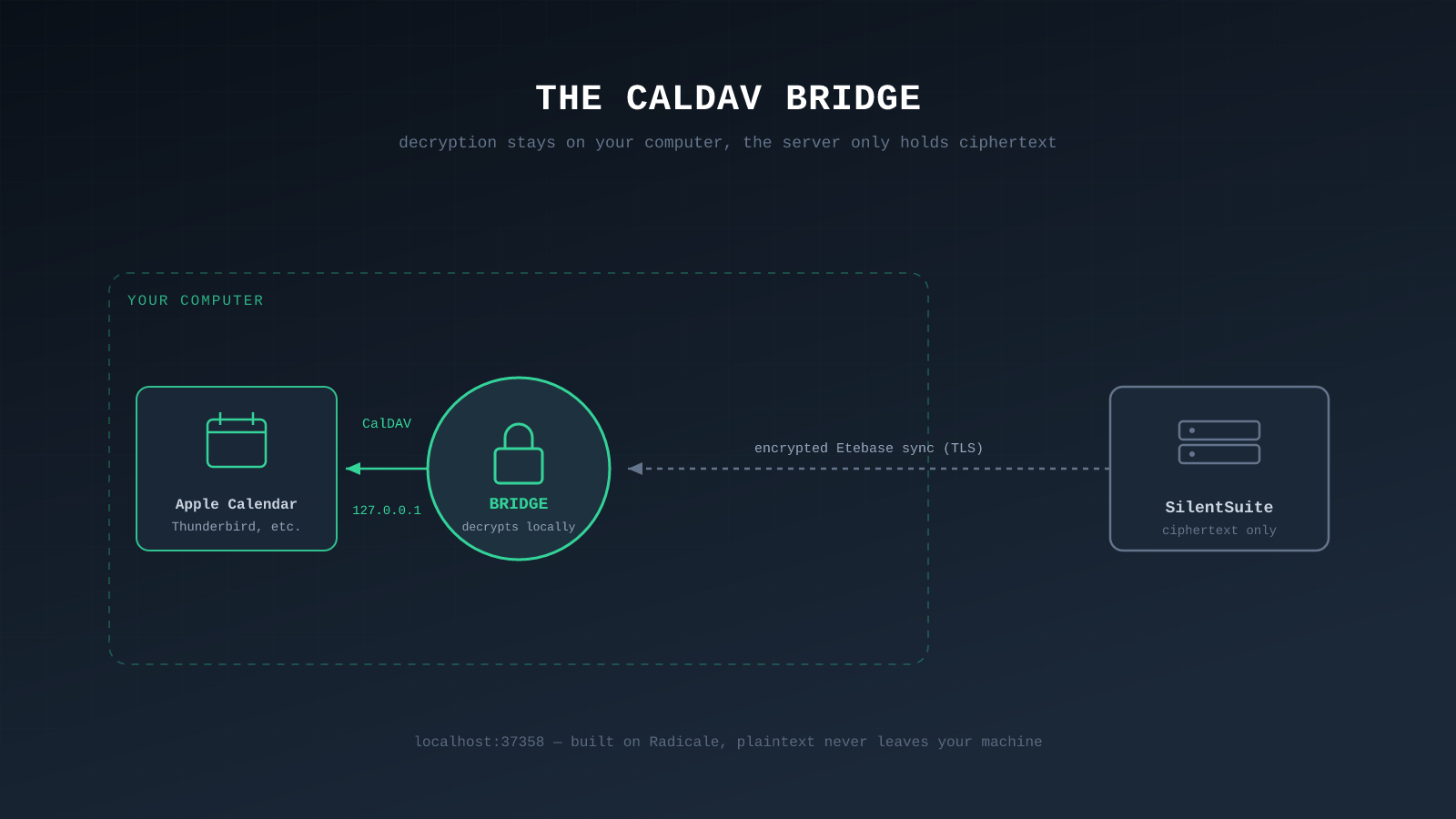
The bridge is built on the open-source Radicale CalDAV/CardDAV server. It pulls encrypted Etebase data down from the SilentSuite server, decrypts it locally with your keys, and serves ordinary CalDAV and CardDAV at http://127.0.0.1:37358, bound to loopback only. Apple Calendar, Thunderbird, and Evolution talk to the bridge, never to the encrypted server, so the server still only ever holds ciphertext. Plaintext exists in exactly two places, both on your device: the bridge's memory and its local cache.
Why can't CalDAV just talk to an encrypted server?
CalDAV and CardDAV are the open standards that let calendar and contact apps sync with a server. Apple Calendar, Thunderbird, Evolution, and DAVx5 all speak them. The problem is that these protocols were designed around plaintext. A CalDAV client expects to GET an event and receive a readable .ics file: title, time, location, all in the clear. There is no place in the protocol for the client to hold decryption keys.
That leaves a hard choice. If a SilentSuite server spoke CalDAV directly, it would have to send plaintext events, which means it would have to be able to read them, which would defeat the end-to-end encryption entirely. A server that can answer a plaintext CalDAV request is a server that can read your calendar. So SilentSuite does not do that. The encrypted server only ever speaks the Etebase protocol and only ever stores ciphertext.
The bridge resolves the tension by moving the plaintext boundary onto your own machine.
What is the SilentSuite bridge?
The SilentSuite bridge is a small daemon you run on your own computer. It is written in Python, built on the Radicale CalDAV/CardDAV server, and it does one job: translate between the plaintext CalDAV/CardDAV that your apps expect and the encrypted Etebase protocol that SilentSuite servers speak. It is the only component that ever holds both your keys and a plaintext view of your data, and it runs nowhere except on your device.
Its life cycle looks like this:
- You sign in once through the bridge, which authenticates to the SilentSuite server and derives your keys locally.
- The bridge syncs encrypted items down from the server and decrypts them on your machine using the same libsodium primitives (XChaCha20-Poly1305) the rest of SilentSuite uses.
- It serves those decrypted items as ordinary CalDAV/CardDAV to apps on your computer, at
http://localhost:37358/. - When you edit an event in your app, the bridge takes the plaintext change, encrypts it locally, and uploads the ciphertext back to the server.
The server never sees any of the plaintext in step 3 or the plaintext input in step 4. Encryption and decryption both happen inside the bridge, on your hardware.
Where does the plaintext live, and where doesn't it?
This is the crux of the design. The bridge binds to loopback only. By default it listens on 127.0.0.1 (localhost), which means it is reachable from your own computer and not from the network. When Apple Calendar asks the bridge for your events, that request never leaves your machine. The decrypted .ics and .vcf data crosses from the bridge to your calendar app over a loopback socket the operating system keeps internal.
Plaintext exists in exactly two places, both on your device: in the bridge's memory while it is decrypting and serving, and in a local decrypted cache the bridge keeps so your apps get fast responses. The moment data goes back to a SilentSuite server, it is ciphertext again. The trust boundary is the edge of your own computer, which is the same place your data has to be decrypted anyway in order for you to read it.
Doesn't a local plaintext server weaken security?
It is a fair worry, and the bridge is built defensively because of it. A few specifics:
- Loopback by default. The bridge listens on
127.0.0.1, so it is not exposed to your local network or the internet unless you deliberately change that. - Host-header checks. The bridge rejects requests whose
Hostheader is not a localhost variant, which is a defense against DNS-rebinding attacks that try to reach a loopback service from a web page. - CSRF protection on its dashboard. The local status dashboard uses a per-process token so a malicious web page cannot drive it through your browser.
- The cache is local and removable. The decrypted cache lives on your computer and is tied to the account; removing the account from the bridge clears it.

The honest framing is that the bridge does not add a new category of risk. Your data has to be decrypted somewhere for you to use it, and that somewhere is always your own device. The bridge just makes that decryption available to standard apps instead of only to the SilentSuite web and mobile clients. If your computer is trustworthy, the bridge is as safe as opening the SilentSuite web app on it. If your computer is compromised, that is a problem the bridge cannot solve and neither can any other client, as explained in the threat model post.
What the bridge does change is which apps on your machine can reach the plaintext. An app-contained client keeps the data to itself; a DAV endpoint hands it to any client you point at it. That is a deliberate choice rather than an oversight, and walled gardens vs system integration sets out when each side of it is the right call.
Which apps work through the bridge?
The bridge supports tested desktop CalDAV/CardDAV clients that can connect to its local http://localhost:37358/ endpoint. Common setups include:
- Apple Calendar and Contacts on macOS, via the local bridge URL.
- Thunderbird for calendar and address book sync.
- Evolution and KDE on Linux desktops.
- Android uses the native SilentSuite app for system-level calendar, contacts, and task sync instead of the desktop bridge.
On Android the native SilentSuite app already handles encrypted sync directly, so the bridge is mainly a desktop story. iOS is on the roadmap, coming soon, and is not currently supported.
FAQ
Does the SilentSuite bridge send my data to a server in plaintext?
No. The bridge decrypts on your computer and serves plaintext only over 127.0.0.1. Data sent back to a SilentSuite server is re-encrypted first. The server only ever holds ciphertext.
What port does the bridge run on?
By default the bridge serves CalDAV/CardDAV at http://localhost:37358/, bound to loopback only.
Why does SilentSuite need a bridge at all?
Because CalDAV and CardDAV expect plaintext, and a server that answered them directly would have to read your data. The bridge keeps decryption on your device so the encrypted server never sees plaintext.
Is the bridge open source?
Yes. SilentSuite is open source under AGPL-3.0, and the bridge is built on the open-source Radicale CalDAV/CardDAV server. SilentSuite has a hosted plan listed as “From €3/mo” and is self-hostable.
Which desktop apps work with the SilentSuite bridge?
Tested desktop CalDAV/CardDAV clients that can reach http://localhost:37358/. Common setups are Apple Calendar and Contacts on macOS, Thunderbird for calendar and address book, and Evolution or KDE on Linux.
Do I need the bridge on Android?
No. The native SilentSuite Android app syncs encrypted data directly into Android's calendar and contacts providers, so the bridge is a desktop component. iOS is on the roadmap, coming soon, and is not currently supported.
Can other devices on my network reach the bridge?
Not by default. The bridge binds to 127.0.0.1 and rejects non-local Host headers, so it is reachable only from your own computer unless you explicitly configure remote access.
The CalDAV bridge is how SilentSuite stays end-to-end encrypted while still working with the calendar and contact apps you already use. The encrypted server speaks only Etebase and stores only ciphertext. The plaintext lives on your computer, where it has to be anyway, and travels no further than a loopback socket.
Get started with SilentSuite, or read What SilentSuite actually encrypts to see what the bridge is decrypting.
Interested in private sync?
SilentSuite is available now as a public beta. Sign up and start syncing your calendar, contacts, and tasks with end-to-end encryption.
Get started for free