 Tim Ross
No product is secure in the abstract. It is secure against specific attackers, under specific assumptions, and honest about the rest. This post is the SilentSuite threat model: a plain-language list of who its encryption, built on the Etebase protocol, protects you from, and who it does not.
I would rather you understand the boundary than assume a guarantee SilentSuite cannot make. If a part of this looks like an admission, it is. A threat model that only lists wins is marketing, not security.
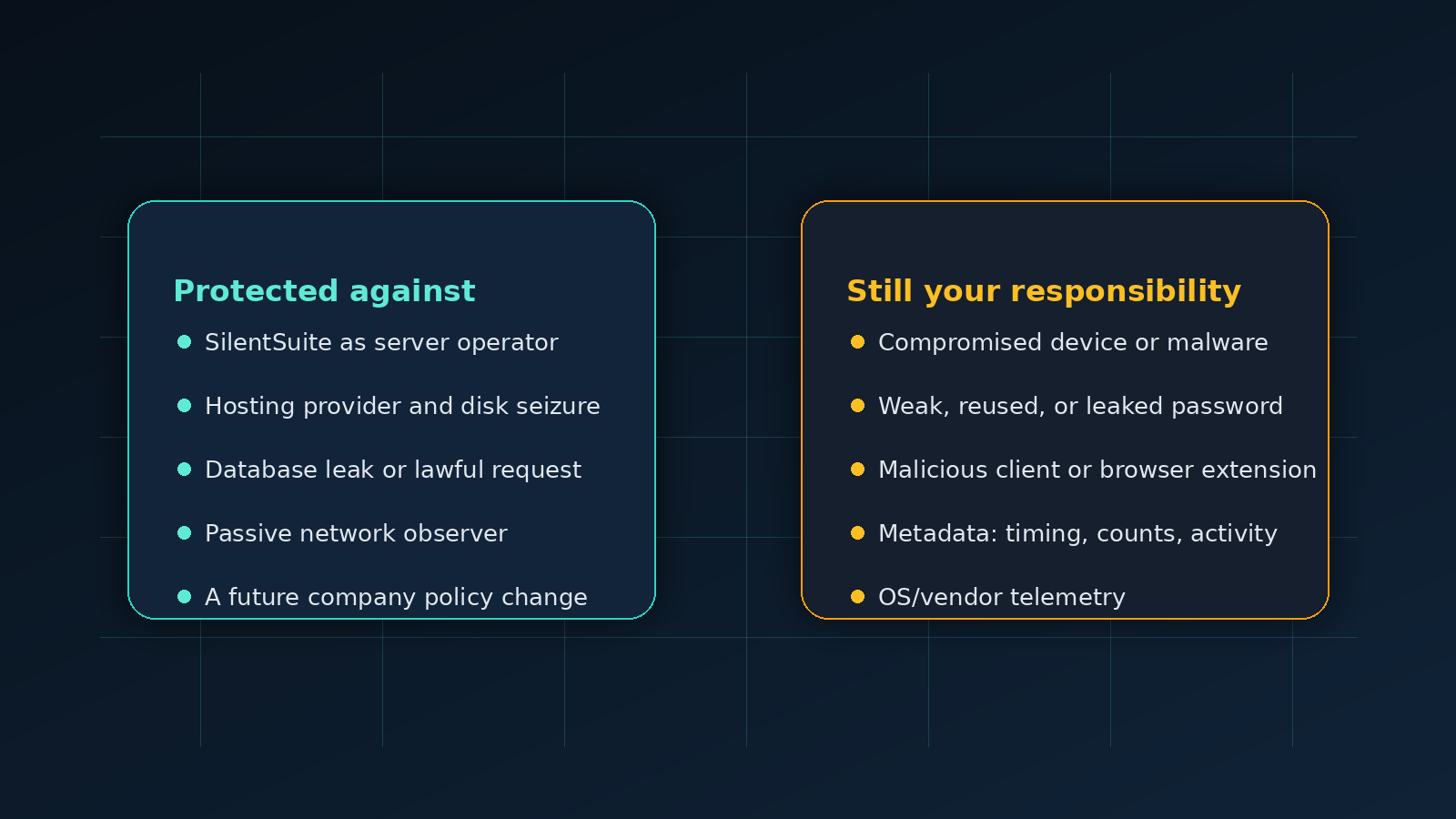
Everything on the server side gets ciphertext: SilentSuite the company, the hosting provider, a database breach, a passive network observer, and a lawful access request. Nothing on your side of the encryption boundary is covered, so a compromised device, anyone who learns your password, or a malicious client build each defeat it entirely. The server also still sees structural metadata: that collections exist, roughly how many items they hold, and when those items changed.
What is a threat model, and why does it matter?
A threat model answers three questions: what are you protecting, who might want it, and what can you actually do about each of them. SilentSuite protects the contents of your calendar, address book, and task lists. The interesting attackers are the server operator (me, for the hosted service), the hosting provider, a network observer, and anyone who gets hold of one of your devices. SilentSuite handles some of those completely and others not at all. The point of this page is to draw that line clearly.
The short version: SilentSuite uses zero-knowledge, client-side encryption, so the contents of your data are protected against everyone on the server side. What it cannot protect is anything that happens before encryption (on your own device) or the metadata that the server legitimately needs to do its job.
Who does SilentSuite protect you against?
These are the attackers the encryption is designed to defeat. In each of these cases, the contents of your events, contacts, and tasks stay unreadable.
SilentSuite, the company
I operate the hosted service, and I cannot read your data. Your calendar events, contact cards, and tasks are encrypted on your device with data keys that the server cannot unwrap. Your password protects the key material, but it is not sent to SilentSuite and it is not used as a bulk data key. The server stores ciphertext. This is what zero-knowledge means in practice: a lawful request to SilentSuite produces encrypted blobs and account metadata, not the plaintext of your schedule. I designed it this way on purpose, so that trusting SilentSuite is not a requirement.
The hosting provider and anyone with the disks
The hosting provider sees the same thing the service does: ciphertext. If someone seized the physical disks, imaged the database, or compromised the host operating system after the fact, they would get encrypted data without the keys to open it. The encryption does not care whether the database is breached, leaked, or lawfully copied. The contents stay sealed.
A passive network observer
Traffic between your device and the server is encrypted in transit with TLS, and the payload inside is already end-to-end encrypted on top of that. Someone watching the network sees that you are talking to a SilentSuite server and roughly how much data moves, but not the contents. (Note the limit: they see that sync is happening. More on metadata below.)
A future SilentSuite that changes its mind
Business models change and companies get acquired. The protection here is structural, not a promise. The server is open source under AGPL-3.0, your data exports to standard .ics and .vcf files, and you can self-host the whole thing. If a future SilentSuite ever became untrustworthy, the encryption would still hold and you could walk away with your data and run the server yourself.
| Attacker | Sees your event/contact/task contents? |
|---|---|
| SilentSuite (the company) | No |
| Hosting provider / disk seizure | No |
| Database breach or leak | No |
| Passive network observer | No |
| Lawful access request to the host | No (ciphertext only) |
| A compromised device of yours | Yes |
| Someone who knows your password | Yes |
| Metadata analysis (existence, timing) | Partial (see below) |

Who can SilentSuite not protect you against?
This is the part most privacy products skip. End-to-end encryption draws a line at your device. Everything on the wrong side of that line is outside what the cryptography can do.
A compromised device
Encryption protects data in transit and at rest on the server. It does not protect a device that is already in someone else's control. If your phone or laptop has malware, a keylogger, or a stalker with your unlock code, the attacker sees your calendar the same way you do, because the data is decrypted there for you to use. No sync product can fix a compromised endpoint. For maximum privacy, I recommend running SilentSuite on GrapheneOS for phones and Linux for desktops or laptops. Stock Google Android, Windows, iOS, and macOS add more vendor services, telemetry, cloud hooks, and opaque system components around the place where your data is decrypted, so the endpoint story is weaker. Device hygiene (full-disk encryption, a strong unlock, keeping the OS updated, and installing as little as possible) is on you, and it matters more than any server-side guarantee.
Anyone who has your password
Your password derives the keys that decrypt your data. That is the property that keeps SilentSuite out, and it is also the property that means a weak or reused password is the whole ballgame. If an attacker learns your password, they can decrypt your data, because at that point they can do exactly what you do. Use a long, unique password, store it in a password manager, and do not reuse it. SilentSuite cannot reset your password into your data for you, which is the honest cost of zero-knowledge: there is no back door for SilentSuite, which also means there is no recovery hatch I can open on your behalf.
A malicious or buggy client
The encryption happens in the client software. If you run a malicious build of an app, or a browser extension that scrapes the page after decryption, the data is exposed at the point of use. This is why the clients are open source and why you should install them from sources you trust. The threat model assumes the client you run is the client SilentSuite published.
Metadata at the server
This is the most important limit to understand. The contents of your items are encrypted, but the server is not blind. To route sync, resolve conflicts, and bill accounts, the server can see that collections exist, roughly how many items are in them, and when they were last changed. The server does not see what an event says, but it can see that an account had activity at a particular time. I cover exactly which fields are encrypted and which are visible in a companion post, What SilentSuite actually encrypts. If your threat model includes an adversary who can correlate timing and volume of sync activity, that adversary learns something, even though they never learn content.
How does this compare to a normal calendar service?
The honest framing is that SilentSuite removes an entire category of attacker that mainstream calendars leave wide open, and is upfront about the categories that remain. If you want the same question asked of Apple, Microsoft, Proton, Tuta, and Nextcloud rather than just Google, who can read your calendar works through each provider in turn.
| Threat | Google Calendar | SilentSuite |
|---|---|---|
| Provider reads your events | Yes | No |
| Server breach exposes contents | Yes | No |
| Lawful access yields plaintext | Yes | No |
| Compromised device exposes contents | Yes | Yes |
| Metadata visible to server | Yes (plus contents) | Partial (no contents) |
Google Calendar processes every event in plaintext, so the provider, a breach, and a lawful request all reach your actual schedule. SilentSuite closes those three. What neither closes is your own device and, to a lesser degree, metadata. The difference is that with SilentSuite the metadata is all an attacker on the server side gets, instead of the full record.
What this means for how you should use SilentSuite
The threat model points to a short list of things that are actually in your hands, because the server-side risks are already handled:
- Pick a strong, unique password. It is the root of your encryption keys. There is no server-side recovery, which is the point.
- Use the strongest endpoint you can. For maximum privacy, use GrapheneOS on mobile and Linux on desktop. On stock Google Android, Windows, iOS, or macOS, assume the operating system and vendor cloud layer are a larger part of your threat model.
- Keep your devices clean. Full-disk encryption, a real lock screen, current updates, and a small trusted app set protect the one place your data is decrypted.
- Install clients from sources you trust. The apps are open source so the encryption can be inspected, not just claimed.
- Know what metadata is. If timing and volume of sync activity are part of your threat model, read What SilentSuite actually encrypts.
SilentSuite's hosted plan is “From €3/mo,” or you can self-host the AGPL-3.0 server and remove the hosted operator from the trust equation entirely. Either way the encryption model is the same, and so is this threat model. What changes is who runs the box and who carries the operational risk, which I weigh up in self-hosting vs hosted.
FAQ
Can SilentSuite read my calendar?
No. Events, contacts, and tasks are encrypted on your device with data keys the server cannot unwrap. A lawful request to SilentSuite produces ciphertext and account metadata, not the plaintext of your schedule.
What happens if the SilentSuite server is breached?
The attacker gets encrypted blobs and structural metadata. The content keys are never on the server, so the events, contacts, and tasks stay unreadable.
Does end-to-end encryption protect a hacked phone or laptop?
No. Your device decrypts your data so you can use it. Malware, a keylogger, or someone with your unlock code sees your calendar the same way you do. No sync product can fix a compromised endpoint.
Can SilentSuite recover my account if I forget my password?
No. Your password derives the keys that decrypt your data. There is no back door for SilentSuite, which also means there is no recovery hatch I can open for you. Use a long, unique password kept in a password manager.
What metadata can the SilentSuite server still see?
That collections exist, roughly how many items each holds, when items were created or changed, and your account login identifier. It sees activity, not content.
Security is a set of trade-offs, not a checkbox. SilentSuite makes a specific one: the contents of your personal information are protected against the server, the host, the network, and me as operator, at the cost of putting password strength and device hygiene squarely in your hands. That is a trade I think is worth making, and one I would rather state plainly than paper over.
Get started with SilentSuite, or read What SilentSuite actually encrypts for the field-by-field detail behind this model.
Interested in private sync?
SilentSuite is available now as a public beta. Sign up and start syncing your calendar, contacts, and tasks with end-to-end encryption.
Get started for free