 Tim Ross
Your calendar is more revealing than your email. Email captures conversations, but your calendar captures behaviour. When you wake up. When you see your therapist. Who you meet for lunch. The flights you book. The recurring calls with your lawyer. This guide compares what Google, Apple, Microsoft, Proton, Tuta, Nextcloud, and SilentSuite can each read in that record.
SilentSuite's hosted public beta starts from €3/mo billed annually, and the server can also be self-hosted under AGPL-3.0.
A single month of calendar data paints a detailed picture of someone's life: habits, relationships, health signals, work patterns. All structured, timestamped, and easy to query.
Most people never ask who else can read this data. So I checked. Here's what the major calendar providers actually do with it.
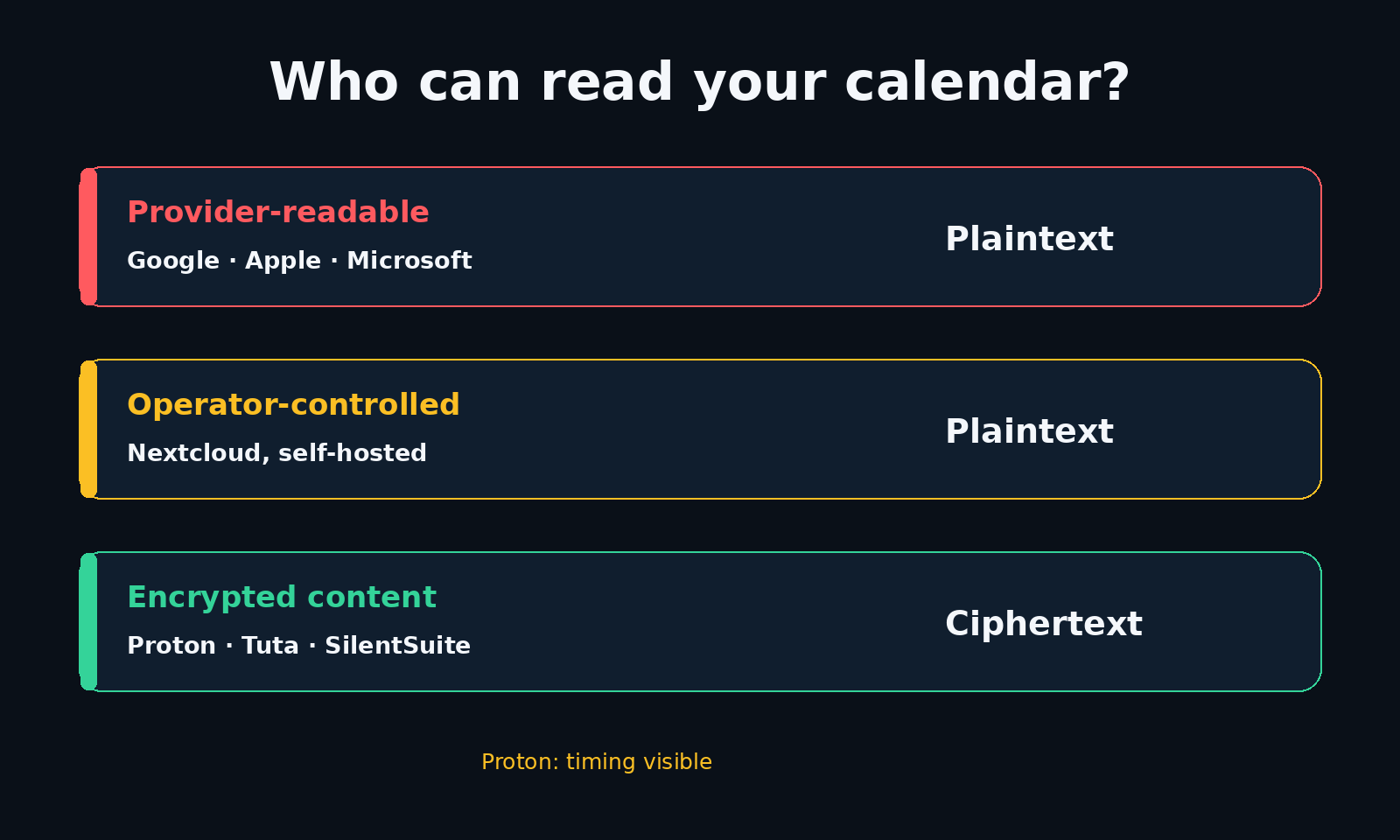
Google Calendar, Apple iCloud Calendar, and Microsoft Outlook can all read your events, because the provider holds the keys. Apple's own security guide excludes iCloud Calendar, Contacts, and Mail from end-to-end encryption even with Advanced Data Protection turned on. Proton Calendar, Tuta Calendar, and SilentSuite encrypt event content on your device, so their servers cannot read it. A self-hosted Nextcloud calendar is under your control but is not end-to-end encrypted, so whoever controls that server can read every event.
Can Google, Apple, and Microsoft read your calendar?
Google Calendar, Apple Calendar (iCloud), and Microsoft Outlook all follow the same model: TLS encryption in transit, encryption at rest on their servers, and the provider holds the keys. That last part is what matters. It means they can decrypt and read your events whenever they need to.
And they do need to. Google processes your calendar for smart suggestions, travel times, and event parsing from Gmail. Microsoft's Copilot analyses calendar data for scheduling insights. These features require server-side access to your plaintext data. Third-party apps can request calendar access through their APIs. Workspace and Microsoft 365 admins have full visibility into employee calendars. And all three comply with law enforcement requests.
Apple deserves a special mention. In 2022, they introduced Advanced Data Protection (ADP) with end-to-end encryption for iCloud backups, Notes, and Photos. But calendar and contacts are explicitly excluded from ADP. Even with it enabled, Apple holds the keys to your calendar. Probably a CalDAV interoperability constraint, but the result is the same.
Are Proton Calendar and Tuta Calendar end-to-end encrypted?
Both Proton Calendar and Tuta Calendar offer genuine end-to-end encryption. Your events are encrypted on your device before they reach the server. The provider cannot read them. This is a real improvement over the Big Three.
Proton is worth one point of precision. Proton encrypts the event title, description, location, attendee list, calendar comments, and member alarms. Start and end times, recurrence rules, and alarm timing are signed rather than encrypted, so the Proton server can read when your events happen even though it cannot read what they say.
The tradeoff is ecosystem lock-in. Neither works with third-party calendar apps. You can't use them with Apple Calendar, Thunderbird, GNOME Calendar, or any other app you might already have. If you're happy using only their own apps, it works. If you want to choose your own software, you're stuck. That trade-off has two sides, and I take both seriously in walled gardens vs system integration: app-contained storage keeps other apps on your device out, while standards support lets them in.
Is a self-hosted Nextcloud calendar end-to-end encrypted?
Nextcloud gives you full control. You run the server, you own the hardware, and it supports CalDAV so it works with practically any calendar app.
But there's an important caveat: Nextcloud's calendar data is not end-to-end encrypted. Events are stored on the server in plaintext. If someone gains access to your instance, they can read everything. Self-hosting reduces who could access your data, but it shifts the risk rather than eliminating it. I compare that shift against hosted encryption, including the hybrid case of a self-hosted end-to-end encrypted server, in self-hosting vs hosted.
How does SilentSuite encrypt your calendar?
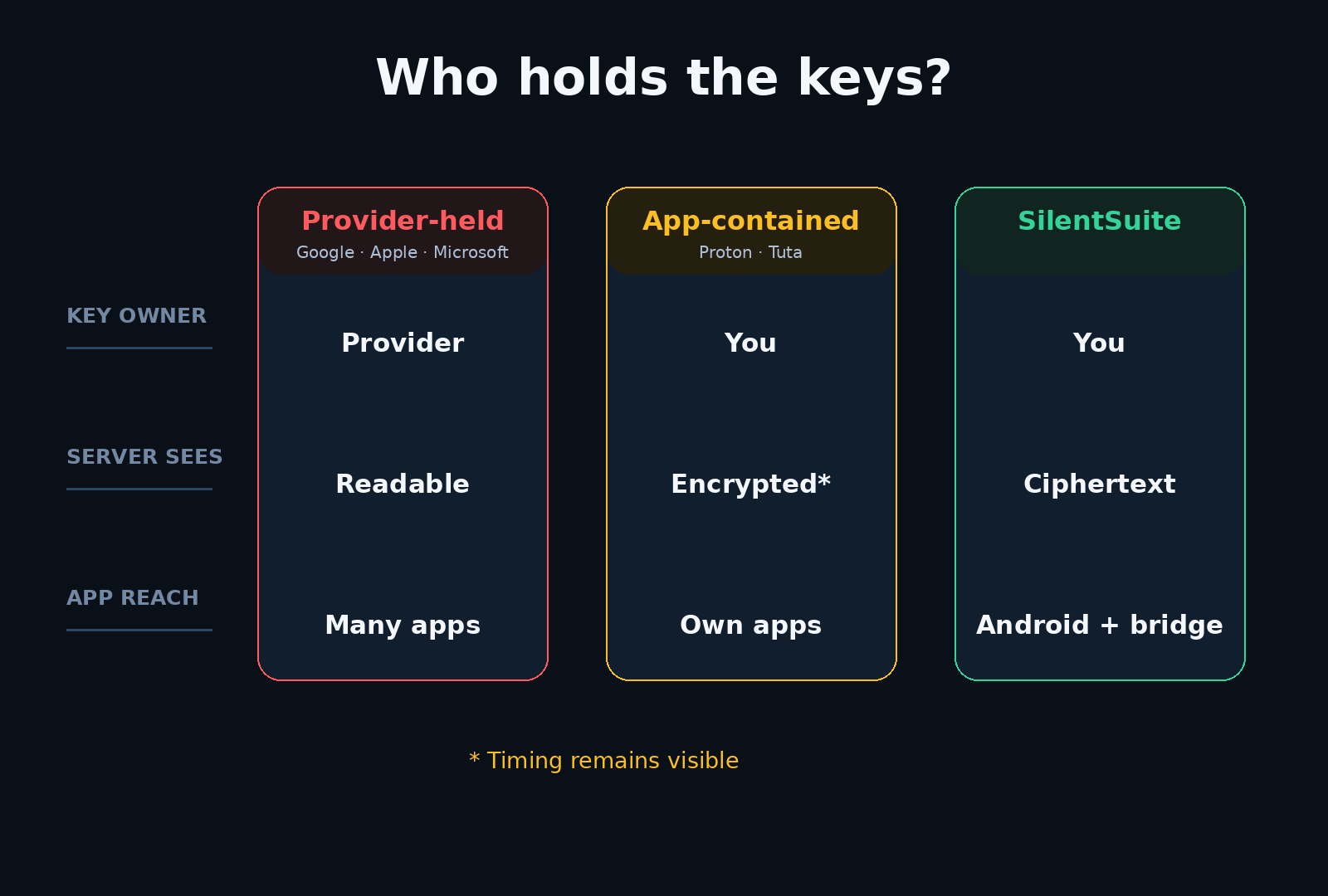
SilentSuite uses the Etebase protocol for end-to-end encrypted sync of calendars, contacts, and tasks. Your data is encrypted on your device before it leaves. The SilentSuite server only stores ciphertext. I cannot read your events. Not if I wanted to. Not if someone asked me to. The field-level detail is in What SilentSuite actually encrypts, and the limits of that guarantee are in SilentSuite's threat model.
The server is hosted on GDPR-compliant EU infrastructure. The code is open source under AGPL-3.0. And because SilentSuite builds on the Etebase protocol, the native Android app can sync with Android's system providers, while the local bridge supports tested desktop clients such as Apple Calendar on macOS, Thunderbird, and GNOME Calendar. I don't think you should have to choose between encryption and supported apps you already like.
I'm honest about the tradeoffs: E2EE means server-side features like smart scheduling or AI suggestions aren't possible. The server can't process what it can't read. If those features matter more to you than encryption, SilentSuite isn't the right fit.
Can an encrypted calendar be as easy to use as Google Calendar?
Privacy tools have a reputation for being hard to use. I want to change that. My goal with SilentSuite is simple: it should be as easy to use as Google Calendar, but with real encryption running in the background.
On Android, the SilentSuite app syncs with the operating system's calendar, contacts, and task providers. On desktop, the local bridge supports tested CalDAV/CardDAV clients; how the CalDAV bridge works explains where it decrypts and what it exposes. iOS is on the roadmap, coming soon, and is not currently supported.
The encryption happens silently between your device and the SilentSuite server. You don't need to think about keys, protocols, or ciphertext. You just use your calendar like you always have, and everything stays private by default. That's the product I'm building.
Quick reference
In this table, desktop compatibility means tested clients on supported desktop platforms. Phone compatibility is platform-specific. SilentSuite supports Android today; iOS does not currently work. The desktop bridge uses CalDAV, the standard language supported calendar clients use to talk to a server.
| Provider | E2EE | Key holder | Open source | Desktop apps | Phone apps |
|---|---|---|---|---|---|
| Google Calendar | No | No | Any | Any | |
| Apple Calendar | No | Apple | Partial | Any | Any |
| Outlook | No | Microsoft | No | Any | Any |
| Proton Calendar | Yes | You | Yes | Proton only | Proton only |
| Tuta Calendar | Yes | You | Yes | Tuta only | Tuta only |
| Nextcloud | No | Server admin | Yes | Any | Any |
| SilentSuite | Yes | You | Yes | Supported | Android |
SilentSuite works on Android and the web, and with supported desktop calendar apps through a local CalDAV bridge. This means you get end-to-end encryption and the freedom to use Apple Calendar on macOS, GNOME Calendar, or Thunderbird.
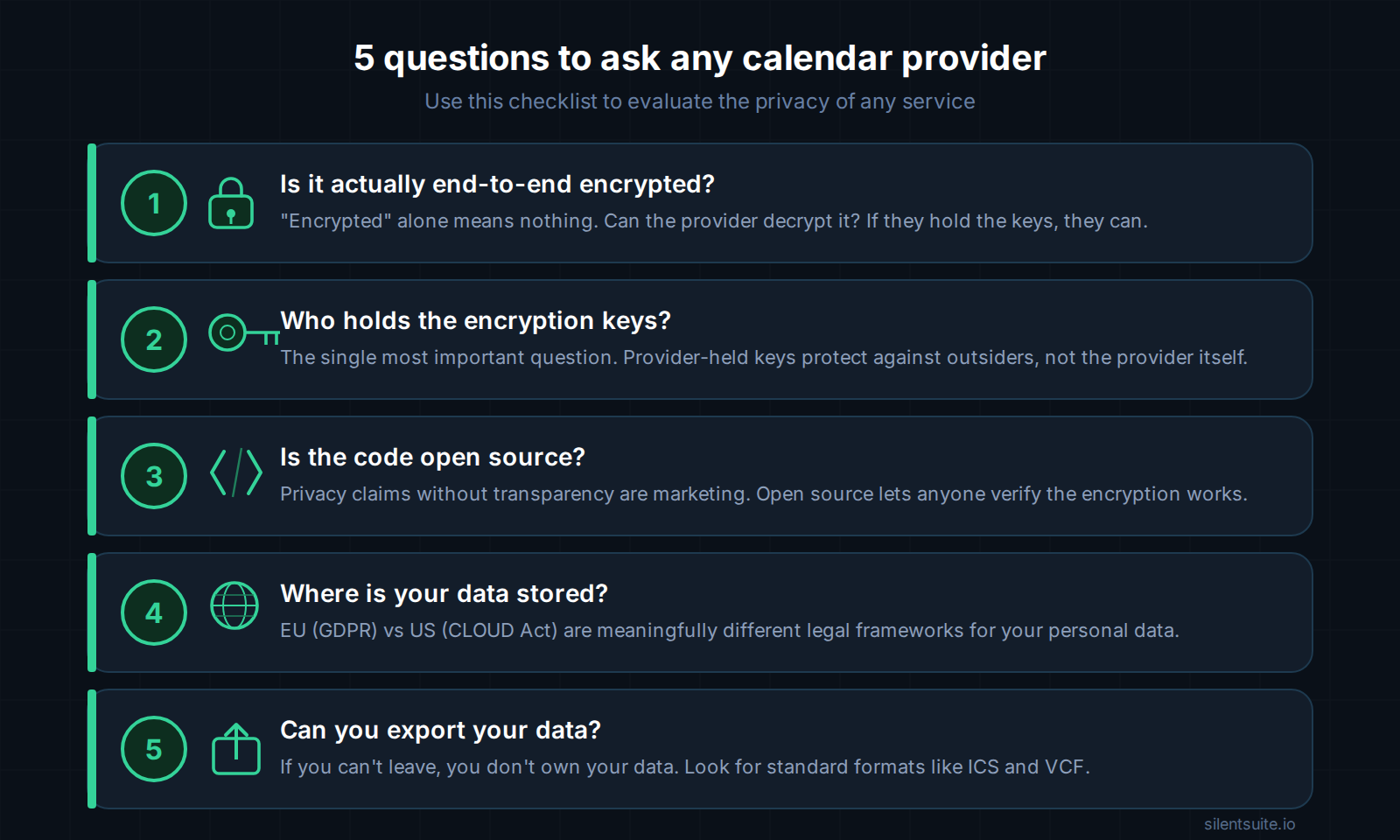
What should you look for in a calendar provider?
The bottom line
We encrypt our messages, our passwords, and our files. But many of us still sync our calendars through services that can read every entry. Not because we don't care, but because the encrypted options were walled gardens, the flexible options weren't encrypted, and the self-hosted options required running your own server.
SilentSuite is built to close that gap. End-to-end encrypted, open source, with zero-knowledge architecture and standard protocol support so you can use supported apps you already like.
FAQ
Can Google read my calendar events?
Yes. Google Calendar processes events in plaintext on Google's servers, because features such as smart suggestions, travel times, and event detection from Gmail require it. Google holds the keys.
Is iCloud Calendar end-to-end encrypted?
No. Apple's own security guide states that iCloud Calendar, Contacts, and Mail are not end-to-end encrypted, and that stays true even with Advanced Data Protection enabled.
Is Proton Calendar end-to-end encrypted?
Mostly. Proton encrypts the event title, description, location, attendee list, calendar comments, and member alarms. Start and end times, recurrence rules, and alarm timing are signed rather than encrypted, so the server can read them. Proton Calendar has no CalDAV, only read-only iCal subscriptions.
Is a self-hosted Nextcloud calendar private?
It is under your control, but it is not end-to-end encrypted. Nextcloud stores calendar data in plaintext, and its server-side encryption covers files only, so it does not protect against a malicious or compromised admin.
Which calendar can nobody else read?
One where you hold the keys. SilentSuite encrypts events, contacts, and tasks on your device with XChaCha20-Poly1305 and stores only ciphertext on the server. It is available “From €3/mo” hosted, or free to self-host under AGPL-3.0.
Your calendar deserves the same protection as your messages. If that matters to you, get started with SilentSuite.
Interested in private sync?
SilentSuite is available now as a public beta. Sign up and start syncing your calendar, contacts, and tasks with end-to-end encryption.
Get started for free