 Tim Ross
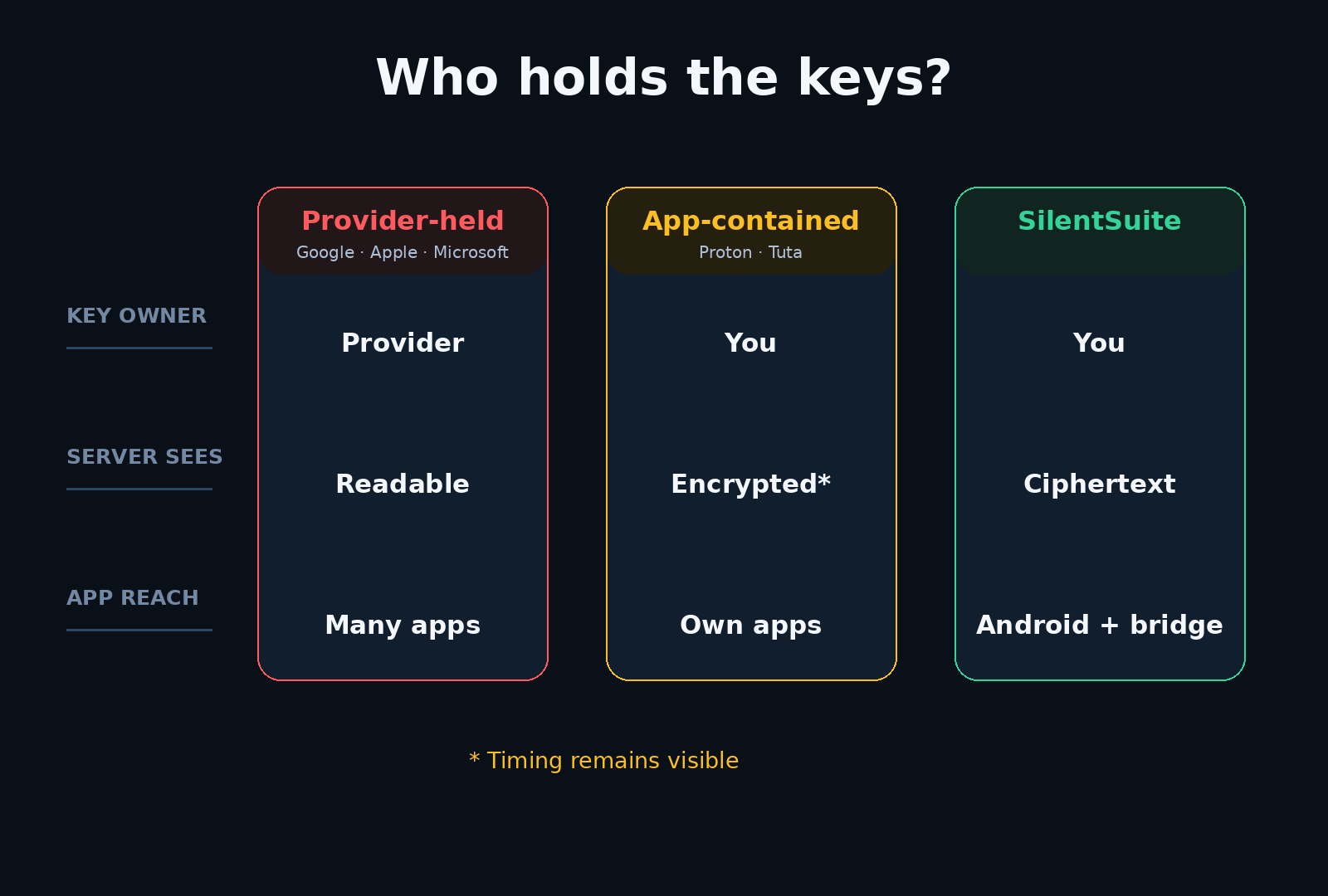
Apple wrote it down themselves. The Platform Security guide states that iCloud Calendar, Contacts, and Mail are not end-to-end encrypted, and switching on Advanced Data Protection does not change it. This post sets out what Apple wrote, why they wrote it, and what a different design buys you, with SilentSuite, which encrypts calendar content on your device, as the comparison.
Apple's Platform Security guide names Calendar, Contacts, and Mail as the exclusions from end-to-end encryption, giving interoperability with global calendar systems as the reason, and Advanced Data Protection does not change that. Reminders is one of the categories Advanced Data Protection does cover. SilentSuite encrypts event content on your device instead, so its server stores ciphertext and CalDAV support runs on your own machine rather than in the cloud.
Is iCloud Calendar end-to-end encrypted?
No, and this is not an inference. The Apple Platform Security guide states it directly:
“Because of the need to interoperate with the global email, contacts, and calendar systems, iCloud Calendar, Contacts, and Mail aren't end-to-end encrypted.”
Advanced Data Protection, introduced in December 2022, raises the number of end-to-end encrypted iCloud data categories from 14 to 23. Mail, Contacts, and Calendar are the notable exclusions. If you turned on Advanced Data Protection expecting it to cover your appointments, it does not.
Apple deserves credit for writing this down plainly in a security document rather than leaving users to guess. Most providers do not.
Why did Apple exclude Calendar from Advanced Data Protection?
Apple gives the reason in the same sentence: interoperability with the global calendar systems. Calendars are not a private silo. They carry invitations across providers, they answer CalDAV clients, and they publish free/busy information to people outside your account. A server that cannot read an event cannot participate in those exchanges on your behalf.
That is a real engineering constraint, not an excuse. The question is whether it is the only possible answer. SilentSuite's answer is a local bridge: the server keeps ciphertext, and a daemon on your own machine decrypts and speaks CalDAV over 127.0.0.1, so standards support lives on your device instead of in the cloud. How the CalDAV bridge works explains where that decryption happens and what it exposes.
Can you use iCloud Calendar on Android?
Yes, unofficially. Apple supports CalDAV and CardDAV for iCloud with third-party clients through caldav.icloud.com, using an app-specific password rather than your Apple ID password. DAVx⁵ documents iCloud as tested, so an Android phone can carry an iCloud calendar.
It is fiddly rather than impossible: you generate the app-specific password on the Apple ID site, and Apple does not present this as a supported consumer feature. It is worth knowing that the option exists, because “iCloud is Apple-only” is a claim that gets repeated more often than it is checked.
iCloud Calendar vs SilentSuite
| Feature | iCloud Calendar | SilentSuite |
|---|---|---|
| E2EE | No (Apple states it) | Yes |
| CalDAV | Yes* (app-specific password) | Via bridge |
| Native integration | Excellent on Apple devices | Native Android app + local bridge on desktop |
| Open source | No | Yes, AGPL-3.0 |
| Price | Free 5 GB; iCloud+ from $0.99/mo (as of 2026-08-15, USD) | From €3/mo (annual) |
| Status | Active | Active |
* iCloud CalDAV works with third-party clients, but it requires an app-specific password and Apple does not document it as a supported consumer path. Because iCloud Calendar is not end-to-end encrypted, Apple can serve those CalDAV clients from readable data.
iCloud pricing checked on apple.com on 2026-08-15 in USD: free 5 GB, then iCloud+ at $0.99/mo for 50 GB, $2.99/mo for 200 GB, $9.99/mo for 2 TB. I did not verify euro pricing, so I quote USD only. SilentSuite is €3/mo on the Early Adopter tier billed annually.
What does Apple do better than SilentSuite?
If you use a Mac, an iPhone, and an iPad, iCloud Calendar is already there, already synced, already tied into Siri, Mail, and Maps. It costs nothing until you outgrow 5 GB. SilentSuite has a native Android app, a web client, and a local bridge for tested desktop clients including Apple Calendar on macOS. iOS is on the roadmap and is not currently supported, which for an Apple household is the honest sticking point.
Note also that Apple's exclusion is specific. Reminders is one of the 23 categories that Advanced Data Protection does cover, with the caveat that reminders synced through CalDAV are not end-to-end encrypted. “Apple does not encrypt your personal data” would be wrong. “Apple does not end-to-end encrypt Mail, Contacts, and Calendar” is what their document says.
What changes when calendar content is encrypted on your device?
SilentSuite encrypts event content on your device before it reaches the server, using the Etebase protocol. The server stores ciphertext and sees item existence, counts, and revision timestamps, not titles, times, locations, or attendees. That is a claim about one boundary, so read it next to SilentSuite's threat model, which covers what encryption does not protect, and what SilentSuite actually encrypts for the field-level detail.
FAQ
Does Advanced Data Protection encrypt my iCloud calendar?
No. Advanced Data Protection raises the number of end-to-end encrypted iCloud data categories from 14 to 23, and Apple's security guide names Mail, Contacts, and Calendar as the exclusions. Reminders is one of the categories it does cover, with the caveat that reminders synced through CalDAV are not end-to-end encrypted.
Why isn't iCloud Calendar end-to-end encrypted?
Apple gives the reason in the same sentence: the need to interoperate with the global email, contacts, and calendar systems. A server that cannot read an event cannot answer CalDAV clients, cross-provider invitations, or free/busy queries on your behalf.
Can I sync my iCloud calendar to an Android phone?
Yes, unofficially. Apple supports CalDAV and CardDAV for iCloud through caldav.icloud.com with an app-specific password, and DAVx⁵ documents iCloud as tested. Apple does not present this as a supported consumer feature.
Does SilentSuite work on iPhone?
Not today. Android, the web app, and supported desktop clients through the local CalDAV bridge work now, including Apple Calendar on macOS. iOS is on the roadmap and is not currently supported.
What can the SilentSuite server see if it cannot read my events?
Item existence, roughly how many items each collection holds, revision timestamps, and your account login identifier. Titles, times, locations, attendees, and calendar names are ciphertext.
Apple went further on end-to-end encryption than most of the industry, then documented that your calendar is outside it. I compared the rest of the field in who can read your calendar and the encrypted options in encrypted calendar sync in 2026. If you want appointments your provider cannot read, get started with SilentSuite.
Interested in private sync?
SilentSuite is available now as a public beta. Sign up and start syncing your calendar, contacts, and tasks with end-to-end encryption.
Get started for free