 Tim Ross
Removing the Google account from an Android phone is the easy part. Deciding where your contacts should live afterwards is the part that takes thought. Four routes are realistic: keep them in a local device account, sync them over CardDAV with an app such as DAVx5, host them in Nextcloud, or use SilentSuite's native Android sync adapter, which is end-to-end encrypted on the Etebase protocol. They differ mainly in where plaintext exists and whether another device can receive updates automatically.
None of these approaches is right for everyone. A single offline phone, a self-hosted family server, and an address book that must stay encrypted from its hosting provider are different requirements. This guide explains the data path for each choice without treating privacy, convenience, and operational control as one score.
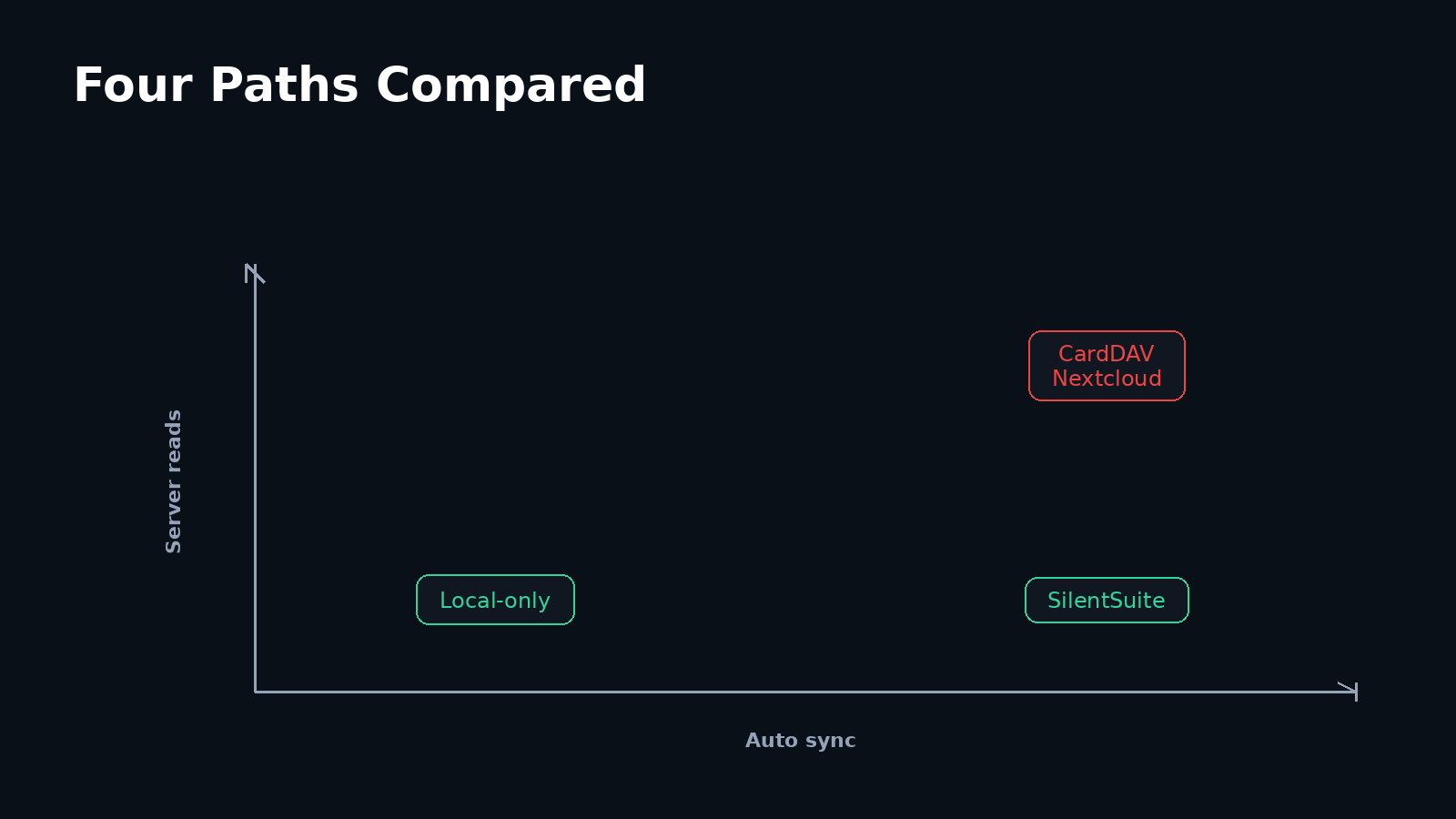
Only the end-to-end encrypted route keeps the sync server from reading names, numbers, and notes, because ordinary CardDAV servers and Nextcloud process readable vCards even over HTTPS. A local device account never leaves the phone, but it never reaches your other devices either. In every synced option, SilentSuite included, the contacts still land in Android's Contacts Provider, where apps you permit can read them. Choose by which of those two exposures matters more to you.
Can Android store contacts without a Google account?
Yes. Android's Contacts Provider supports local accounts as well as cloud-backed accounts. When your contacts app offers a choice such as “Device,” “Phone,” or “Local,” select that location instead of a Google account. Labels vary by phone maker and contacts app, and some vendor apps make the local option less prominent.
Local-only storage is the shortest data path, but check one separate Android setting before treating it as Google-free. On Google-enabled phones, Google Contacts can copy device and SIM contacts into a selected Google account through Sync device and SIM contacts automatically. Disable that feature and confirm the contact remains assigned only to the device account. With cloud copying disabled, no contact server receives the address book. The trade-off is equally direct: local contacts do not automatically appear on another phone and may disappear with a lost, damaged, or reset device unless you maintain a separate backup.
- Create a test contact and explicitly choose the local or device account.
- Open the contact's details and confirm that its storage account is not Google or another cloud service.
- If Google Contacts is installed, verify that automatic device and SIM contact backup and sync is disabled.
- Export a
.vcffile periodically and store the backup in a location you control. Test importing that file before relying on it. - Review which installed apps have the Android Contacts permission. Local storage removes the sync server, but it does not hide contacts from apps that Android permits to read the system address book.
How does CardDAV sync contacts on Android?
CardDAV is an IETF standard for accessing, managing, and sharing vCard contact data on a server. Android does not include a general CardDAV account type on every device, so a sync adapter commonly fills that role. DAVx5 is an open-source CalDAV and CardDAV sync app that connects a compatible server to Android's system providers.
DAVx5 does not keep the usable address book inside its own private user interface. Its documentation explains that synchronized contacts are stored in Android's Contacts Provider. That is why they can appear in your contacts app, dialer, and other apps to which you grant contact access.
Use HTTPS for CardDAV so TLS protects vCards while they travel between the phone and server. TLS is transport encryption, not end-to-end encryption. Ordinary CardDAV sends contact data in a form the CardDAV service can process, so the service and its administrator can read it. DAVx5 is a sync client and does not add a separate E2EE layer to an ordinary CardDAV server.
A practical CardDAV setup
- Choose a CardDAV service or operate your own server. Confirm its HTTPS URL, username, and authentication requirements.
- Install DAVx5 from one of the distribution channels linked on the DAVx5 download page.
- Add the CardDAV account, let discovery complete, and enable the address books you want on the device.
- Grant contacts access, then choose the new DAVx5 address book as the destination when creating a contact.
- Move existing local contacts deliberately. DAVx5 notes that local contacts are not automatically assigned to its account. Exporting them to
.vcfand importing them into the CardDAV-backed account is one documented route.
How does Nextcloud contact sync differ from generic CardDAV?
Nextcloud is a broader self-hosted collaboration platform that includes a CardDAV backend for address books. On Android, its documented setup uses DAVx5 to discover the Nextcloud account's address books and write selected contacts into Android's Contacts Provider.
The Android data flow is therefore the same standards-based shape as another CardDAV service. The difference is operational scope. You can run Nextcloud yourself, choose its storage and backup policy, manage users, and also use its web contacts interface. A hosted Nextcloud provider runs those parts for you.
Nextcloud Contacts over ordinary CardDAV is not built-in E2EE. HTTPS protects the network connection, and disk or server-side encryption may protect storage media, but the running Nextcloud service must handle readable contact data to provide CardDAV and the web interface. If the threat model includes the Nextcloud administrator or a compromised server process, treat that operator as able to read the address book. Self-hosting changes who controls that readable server. It does not turn CardDAV into E2EE.
Follow Nextcloud's current Android synchronization guide for account discovery and collection selection. Before importing your full address book, create one test contact on the phone and one in the Nextcloud web interface, then confirm that edits travel in both directions.
How does end-to-end encrypted Android contact sync work?
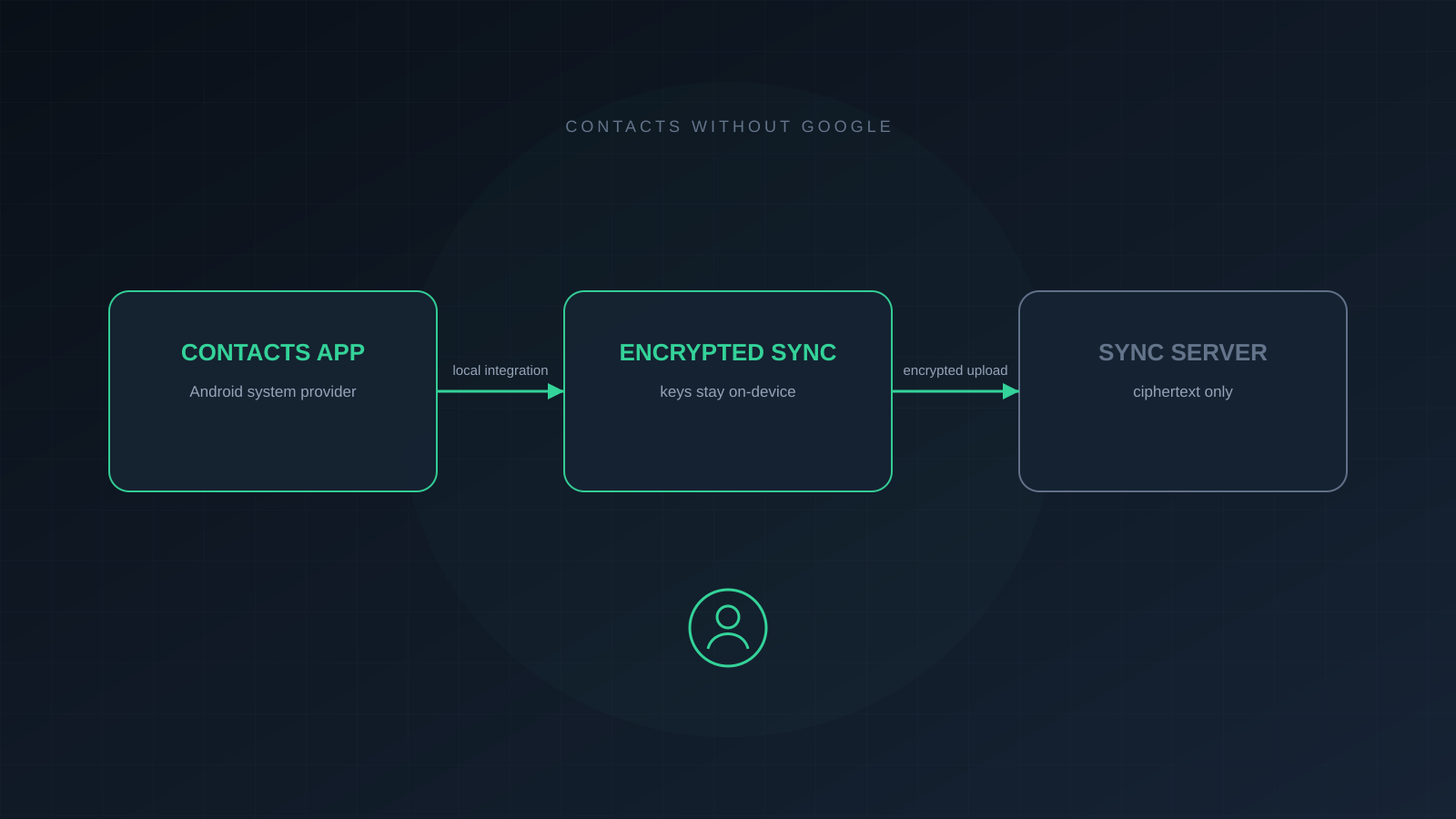
End-to-end encrypted sync moves the trust boundary from the server to your devices. A client encrypts contact contents before upload, the sync server stores ciphertext, and another authorized client downloads and decrypts it locally. The server still handles account and synchronization metadata, but it does not receive readable names, phone numbers, email addresses, notes, or photos. For the exact split between encrypted content and the structural metadata a sync server still needs, read What SilentSuite actually encrypts.
SilentSuite uses the open Etebase protocol for this encrypted sync. Its native Android app is a sync adapter rather than a separate contacts interface. After local decryption, the app writes contacts to Android's standard Contacts Provider, where the contacts app and dialer can use them. The public SilentSuite Android guide covers installation and account setup.
The remote leg carries Etebase ciphertext. Plaintext exists on the unlocked phone after the native sync adapter decrypts it and writes it to Android's Contacts Provider.
E2EE does not keep the contacts encrypted from Android after you choose system integration. That local exposure is what lets incoming calls show names and lets the dialer search your address book. Review contact permissions, use a strong screen lock, and keep the device updated. For a fuller discussion of that boundary, read walled gardens versus system integration.
SilentSuite's server and bridge are open source under AGPL-3.0, while the Android app is GPL-3.0. You can use the hosted service or a self-hosted server. Hosted plans: From €3/mo. The native Android path talks Etebase to the server. It does not send plaintext CardDAV to the hosted SilentSuite server. The standalone CardDAV bridge is a separate, local option for supported desktop clients, not the Android sync path.
Which Android contact setup matches each threat model?
Compare the trust boundaries before comparing feature lists. “Server can read contact contents” refers to the service while it is operating, not only to whether a disk is encrypted at rest.
| Choice | Automatic sync | Server can read contents | Android system integration | Other-device path | Built-in E2EE |
|---|---|---|---|---|---|
| Local-only contacts | No | No, if cloud backup is off | Yes | Manual export and import | Not applicable |
| CardDAV with DAVx5 | Yes | Yes | Yes | CardDAV clients | No |
| Nextcloud with DAVx5 | Yes | Yes | Yes | Nextcloud and CardDAV clients | No |
| SilentSuite native Android sync | Yes | No | Yes | SilentSuite and supported integrations | Yes |
- Choose local-only contacts when one device is enough, no remote copy is the main goal, and you will maintain tested backups.
- Choose CardDAV with DAVx5 when standards compatibility and multi-device sync matter, and you trust the CardDAV operator with readable contacts.
- Choose Nextcloud with DAVx5 when you also want Nextcloud's web interface, sharing, and self-hosted operational model, and you accept that the Nextcloud service can process the contacts.
- Choose E2EE sync such as SilentSuite when the sync server must not read contact contents, while Android's native contacts and dialer integration still matter.
Whichever row you pick, write down which party you are refusing to trust. The SilentSuite threat model sets out what encrypted sync does and does not defend against, including a lost password and a compromised phone.
How can you move contacts without losing data?
- Export first. Create a complete
.vcfbackup from the current source and preserve it unchanged until the migration is verified. - Test with a small address book. Check names, multiple phone numbers, email addresses, notes, photos, groups, and non-Latin characters on the destination.
- Set the destination account explicitly. New Android contacts can otherwise continue landing in the old Google or local account even after the new sync account is installed.
- Verify both directions. Edit one contact on Android and another on a second client, then wait for each change to arrive.
- Check for duplicates before deleting anything. Android may visually join raw contacts from different accounts. A joined entry can look like one contact even while two account copies remain.
- Disable the old sync only after verification. Keep the original export until you have also tested restore or import on the new system.
For more context on why full contact records are sensitive, see the guide to encrypted contacts.
FAQ
Can I use Android contacts without signing in to Google?
Yes. Save contacts to a local device account and disable automatic device and SIM contact backup to Google, or add a non-Google sync account through a CardDAV adapter, Nextcloud, or an E2EE sync app. Confirm the selected account whenever you create or import contacts.
Does DAVx5 make CardDAV end-to-end encrypted?
No. DAVx5 can use HTTPS to protect the connection, but an ordinary CardDAV server receives contact data it can process. DAVx5 integrates that service with Android; it does not add built-in E2EE to the server.
Are Nextcloud contacts end-to-end encrypted?
Not through the ordinary Contacts and CardDAV path. The running Nextcloud service can process the contact data. Self-hosting gives you control of that server, but it does not by itself make CardDAV E2EE.
Can the SilentSuite server read my Android contacts?
SilentSuite syncs contact contents as Etebase ciphertext, so the server cannot read the contact fields. After decryption on Android, apps with permission to the system Contacts Provider may read the local copy.
Will existing local contacts start syncing automatically?
Usually not. Contacts belong to a specific Android account. Export local contacts to a .vcf backup, import them into the intended sync account, verify the result, and only then remove duplicates or disable the old source.
What is the best way to sync contacts on Android without Google?
It depends on which party you are trying not to trust. Local-only storage removes the sync server entirely but leaves you without a second device. CardDAV with DAVx5 gives standards-based multi-device sync to an operator who can read your address book. End-to-end encrypted sync such as SilentSuite keeps the server out of the contact contents while still filling Android's Contacts Provider for the dialer and caller ID.
Do I need DAVx5 to use SilentSuite contacts on Android?
No. The SilentSuite Android app is its own sync adapter and speaks Etebase to the server, so DAVx5 is not part of that path. The standalone CardDAV bridge is a separate option for supported desktop clients, not for the phone.
Removing Google from contact sync is not one switch. It is a choice about where the authoritative copy lives, who can read it, and how recovery works. Pick the data path that matches those requirements, then verify it with a small test before moving the only copy of your address book.
Interested in private sync?
SilentSuite is available now as a public beta. Sign up and start syncing your calendar, contacts, and tasks with end-to-end encryption.
Get started for free