 Tim Ross
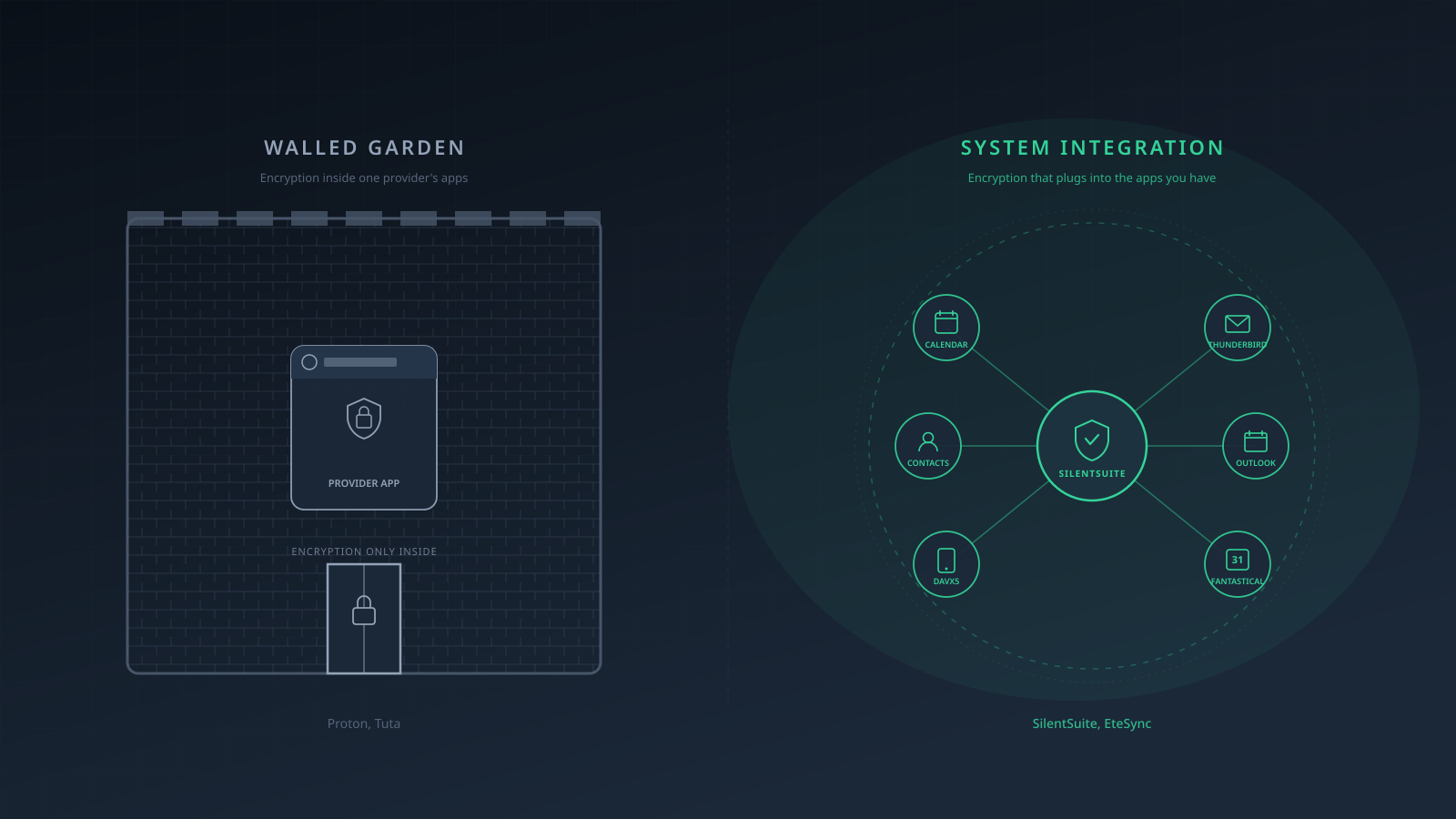
Two encrypted-calendar designs are both defensible and they disagree completely. One keeps your data inside the provider's own apps, where nothing else on the device can read it. The other decrypts locally and hands the data to the operating system, where every app you have permitted can. Proton Calendar takes the first route: it does not expose a general CalDAV/CardDAV interface, and Proton says its external-calendar subscriptions are read-only because Proton Calendar is built around end-to-end encryption. That design limits standards-based interoperability and also limits one route by which third-party apps could receive calendar data. SilentSuite offers an app-contained web path plus explicit desktop and Android integration paths. Hosted plans: From €3/mo. The server and bridge are AGPL-3.0, while the Android app is GPL-3.0.
This post walks through the trade-off the way I actually think about it. There is no universally correct answer. There is an answer that fits your device, your threat model, and the apps you live in.
Choose by how much you trust the software already installed on the device, because encryption on the server settles nothing about who can read the data locally. A walled garden keeps encrypted calendar and contact data inside one provider's own apps, so nothing else on the device can read it. A system-integration product decrypts locally and hands the data to the operating system's calendar and contacts providers, so any app with the matching permission can read it. SilentSuite supports both shapes, with an app-contained web client alongside a desktop CalDAV/CardDAV bridge and an Android sync adapter.
What does “walled garden” actually buy you?
In privacy software, a walled garden is an app-contained default: data stays inside the provider's own apps unless the user enables an explicit integration or export path. Proton Calendar does not offer general CalDAV. Proton Mail's roadmap lists future synchronization into a phone's default contacts app, which would reopen that local system surface if released and enabled.
That sounds like lock-in. It is also a real privacy property. On a typical phone, your address book is the most-requested permission on the whole device. Every messaging app, every social app, every “sign up with phone number” flow asks for it. Every advertising SDK that ships inside an app you barely think about asks for it. The moment your contacts live in the system contacts provider, those apps can read them. That address book is a social graph before it is a list of numbers, which is the case I make in encrypted contacts in 2026.
Proton's published guidance says external calendar subscriptions remain read-only because Proton Calendar is built around end-to-end encryption. It does not present device-permission isolation as the sole reason for the product design. The practical local consequence is still relevant: without a general CalDAV/CardDAV integration path, fewer third-party apps receive calendar or contact data through those standards. See Proton's external calendar guidance.
For a meaningful share of users this is the better privacy posture. End-to-end encryption protects data on the network and on the server. It does not protect data on a device that has 80 installed apps, half of which would happily read your address book if asked. A walled garden does.
What does system integration actually cost?
System integration is the opposite shape. On desktop, a local bridge can expose decrypted calendars and contacts through CalDAV and CardDAV. On Android, the native sync adapter decrypts locally and writes calendars and contacts to Android's system providers. Android has no built-in task provider, so task integration requires a compatible app such as Tasks.org or OpenTasks. Apps with the relevant local permission can then read the provider data.
On a typical stock Android phone, that surface is wide. Granting contacts permission to one app gives that app access to every contact on the device, including encrypted contacts that the SilentSuite app has synced into the system contacts provider. Granting calendar permission has the same effect. The encryption boundary between you and your sync provider is intact. The boundary between your contacts and the apps you have installed is whatever the operating system enforces.
That is not a bug in the bridge model. It is the explicit trade-off. You get the encrypted data inside the apps you already use, including the dialer that calls someone when you tap their number, the calendar that reminds you about a meeting, the maps app that resolves an address. Convenience comes back. Some surface area comes with it.
When walled gardens are the right call
Pick the walled garden when you cannot personally vouch for every app on your device, and when system-level convenience is not worth the spread. Concrete cases:
- Stock Android with the usual app sprawl. Phones come pre-loaded with apps from the manufacturer, the carrier, and a long tail of third-party SDKs embedded in apps you did install. Granting contacts permission is rarely a single decision; it's a decision you keep making, often for apps you forgot about.
- iOS for non-technical users. Apple's permission model is good, but the path of least resistance is still to tap “Allow.” If you don't want to make a permissions decision every time an app asks, walling the data off entirely is a stronger guarantee than careful clicking.
- Windows or macOS with a lot of installed software. Desktop apps may request access to contacts and calendars. macOS places those APIs behind per-app privacy permissions, so review the grants rather than assuming every installed app has access. An app-contained calendar keeps the data out of the shared system stores entirely.
- Anyone whose threat model includes the device itself. If the laptop or phone is shared, managed by an employer, inherited from a partner, or sometimes used by a child, the fewer paths to the data, the better.
The privacy point is sharp: the only data that cannot leak through an app permission is data that the OS doesn't have. Walled gardens are the cleanest way to get that.
When system integration is the right call
Pick system integration when you trust the operating system and you trust the apps that have permission to read the system address book or calendar. That is a real, achievable threat model in 2026, especially on a few specific platforms:
- GrapheneOS, CalyxOS, or another privacy-focused Android. A smaller app set and deliberate permission grants can narrow local exposure. The native SilentSuite app can put decrypted contacts and calendars into the system providers, but the security result still depends on the profile, installed apps, permissions, and device state.
- Linux desktops where you control the package set. Thunderbird, Evolution, KDE Kontact, GNOME Calendar. The number of apps that can read your CalDAV/CardDAV data is bounded by what you installed. If you trust that set, the bridge model is a better fit than browsing to a webapp every time you want to look up a number.
- Locked-down macOS where you actually use the permission prompts. If you reflexively decline calendar and contacts access for new apps, and only grant it to known good ones, you've approximated the same posture by hand.
- Anyone who needs phone-level integration for daily life. Tap a contact and call them. Get a calendar notification on your watch. Have your maps app surface the address of your next meeting. These are not luxuries for many people; they are the workflow. Losing them is a real cost, not just an aesthetic preference.
The convenience point is sharp the other way: in a walled garden, copying a phone number from your contacts app to your dialer is a manual step. Pasting an event from your calendar app into your meeting prep is a manual step. Multiplied across a day, it adds up to noticeable friction. For users on a trusted OS, paying that friction is the wrong trade.
How SilentSuite supports both
SilentSuite is the same encrypted service either way. What changes is where you decrypt it.
App-contained mode: use the SilentSuite web app on a trusted device and do not install the desktop bridge. The current Android app is different: it is a sync adapter that writes decrypted data into Android's calendar and contacts providers. Tasks use a compatible task app because Android has no built-in task provider. Android is therefore a system-integration path, not a Proton-style walled garden.
System-integration mode: on desktop, install the standalone CalDAV/CardDAV bridge for supported clients such as Apple Calendar on macOS, Thunderbird, and Outlook. On Android, use the native SilentSuite app to sync with the operating system's calendar and contacts providers, plus a compatible task app where needed. Decryption remains local in both modes.
You can mix the two on different devices. Run system integration on your GrapheneOS phone where you control the app surface, and stick to the SilentSuite webapp on a work laptop you don't fully trust. The encrypted store is the same in both places. Where the plaintext appears is a per-device decision.
Doesn't the bridge break the encryption story?
No. The bridge runs on your device and holds your decryption key locally. It serves plaintext DAV over loopback HTTP on 127.0.0.1, so the plaintext stays on the device rather than traversing an external network. The upstream connection to the server carries encrypted Etebase data. The local client and loopback endpoint are therefore part of the trusted device boundary.
What does change is who on that device can read the plaintext. With the walled-garden mode, only SilentSuite's own apps can. With the bridge, every app that has permission to the system address book or calendar can. That is the surface the bridge opens, and it is the surface a walled garden closes.
So which should you pick?
Pick the walled garden if you don't fully trust every app on your device, or if you specifically want your contacts and calendar out of the system surface where ad SDKs and other apps can reach them. Proton and Tuta are both reasonable choices in this category; SilentSuite's webapp-only mode is another. For how those services line up on encryption, CalDAV, licensing, and price rather than on integration shape, see encrypted calendar sync in 2026.
Pick system integration if you run a hardened OS, control your app set, and want your encrypted PIM data to flow naturally into the rest of your tools. SilentSuite is built specifically to support this side of the trade-off without compromising the encryption boundary on the server.
Encryption protects data on the wire and on the server. The walled-garden vs system-integration choice protects data on the device. Both decisions matter. Pick them deliberately. And if you have not yet settled the first question, of who can read your events at all, who can read your calendar compares seven providers on exactly that.
FAQ
Why doesn't Proton Calendar support general CalDAV?
Proton says external calendar subscriptions remain read-only because Proton Calendar is built around end-to-end encryption. Its published explanation focuses on that encryption model, not solely on local app permissions.
Can I use SilentSuite as a walled garden, like Proton?
On the web, yes: use the SilentSuite web app on a trusted device and do not install the desktop bridge. The current Android app intentionally syncs into Android's system providers, so it is not an app-contained walled-garden mode.
Is system integration safe on GrapheneOS?
GrapheneOS provides profile isolation and permission controls that can reduce which apps can reach local data. You still need to install the sync adapter and calendar or contacts apps in the same profile, review their permissions, and keep the device secure.
Can I mix the two modes on different devices?
Yes. The encrypted store is one. Where you decrypt it is a per-device choice. Use the bridge on your trusted Linux laptop, the native Android app on your GrapheneOS phone, and the web app on your work machine.
Does Tuta Calendar support CalDAV?
No. Tuta reaffirmed in February 2026 that Tuta Calendar has no CalDAV support, which puts it firmly on the walled-garden side. Tuta Contacts added device address-book sync and caller ID in February 2024, but through Tuta's own app rather than through CardDAV.
Which mode does the SilentSuite Android app use?
System integration. It is a sync adapter that decrypts locally and writes into Android's calendar and contacts providers. Tasks need a compatible app such as Tasks.org or OpenTasks, because Android has no built-in task provider.
If I leave SilentSuite, can I take my data?
Yes. Standard .ics and .vcf exports work from the web client. The Etebase server is open source if you want to keep running on the same protocol with someone else, or yourself.
Encryption alone is not the differentiator anymore. The shape of the integration is. Some users want their encrypted PIM nailed shut inside one provider's apps; some want it flowing through the rest of their trusted tools. Try SilentSuite and pick the mode that fits your device. Proton and Tuta are reasonable choices for the walled-garden side. Both options are better than the plaintext default that almost everyone is still on.
Interested in private sync?
SilentSuite is available now as a public beta. Sign up and start syncing your calendar, contacts, and tasks with end-to-end encryption.
Get started for free